Enterprise Resource Planning (ERP): What It Is, How It Works & How to Choose (2026 Guide)
Enterprise Resource Planning (ERP): What It Is, How It Works, and How to Choose One
A mid-sized manufacturer ships a few thousand orders a day. Sales tracks inventory in one spreadsheet, the warehouse keeps another, and finance reconciles both at month end — usually finding numbers that don’t match. Nobody’s lying; the company just runs on disconnected systems, and every handoff is a chance for the data to drift.
Enterprise resource planning software exists to kill that drift. It pulls finance, inventory, HR, sales, and operations into one shared system so everyone works from the same numbers. This guide explains what ERP actually is, how it works under the hood, what it costs, which systems dominate in 2026, and how to pick one without regretting it.

What Is Enterprise Resource Planning?
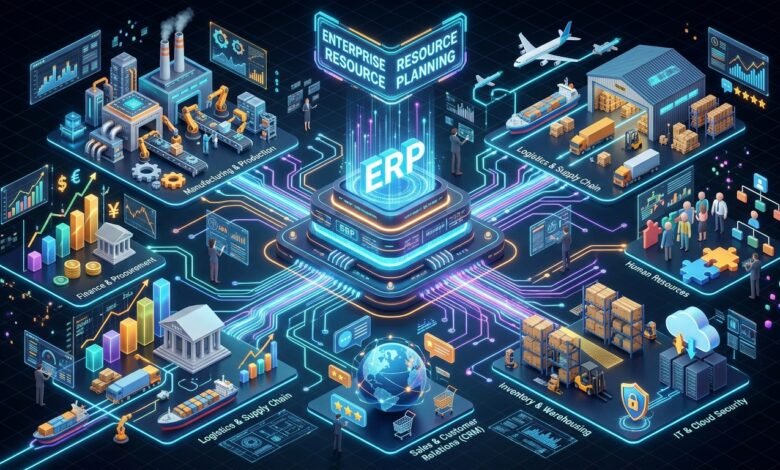
Enterprise resource planning (ERP) is business management software that integrates a company’s core processes — finance, human resources, supply chain, manufacturing, inventory, procurement, and more — into one unified system built on a shared database. Instead of each department keeping its own records, everyone enters and reads data in the same place, in real time.
The “resources” in the name are the things a business plans around: cash, raw materials, production capacity, and people. The “planning” part is literal — ERP tracks what you have, what you’ve committed to (orders, purchase orders, payroll), and what you’ll need so supply can meet demand without waste.
The finance module sits at the heart of nearly every ERP. It acts as the system of record, capturing the commercial impact of every transaction in the general ledger. Everything else — a shipment leaving the warehouse, a new hire starting, a purchase order being approved — feeds into that same financial picture. That’s what separates ERP from a bundle of standalone apps: one database, one version of the truth.
How Does ERP Work?
Strip away the marketing and an ERP does three things:
- Centralizes data. All modules read from and write to a common database. When a sales rep confirms an order, inventory levels, warehouse tasks, invoicing, and the general ledger all update from that single event — no re-entry, no reconciliation.
- Standardizes processes. ERP ships with industry-standard workflows for things like procure-to-pay and order-to-cash. Companies can customize, but most successful projects adapt their processes to the software rather than rewriting the software to match broken processes.
- Surfaces insight. Because the data is unified, dashboards and reports draw from live numbers instead of week-old exports. Managers see cash position, stock levels, and production status without waiting for someone to compile them.
Think of it less like a collection of tools and more like a nervous system. A customer changes a delivery date in the sales module; procurement sees the shift, production reschedules, and finance revises the revenue forecast — automatically, because the information flows instead of being handed around.
A Brief History of ERP
ERP didn’t appear out of nowhere. It grew out of manufacturing planning tools over several decades:
- 1960s — Inventory control packages. Early mainframe programs tracked stock levels and reorder points.
- 1970s — Material requirements planning (MRP). Systems like the one adopted by Black & Decker in 1964 combined production schedules with bills of materials to calculate exactly what raw materials were needed and when.
- 1980s — Manufacturing resource planning (MRP II). Added capacity planning, shop-floor control, and cost accounting — manufacturing’s first attempt at an integrated picture.
- 1990s — ERP. The Gartner Group coined the term “enterprise resource planning,” and vendors extended MRP II beyond manufacturing to finance, HR, and sales. This is when companies like SAP became global names.
- 2000s — Extended ERP. Add-on modules for customer relationship management (CRM), supply chain management, and e-business arrived.
- 2010s–today — Cloud ERP. Subscription-based, browser-accessed systems removed the need for on-site servers, opening ERP to small and mid-sized businesses. Growth since the early 2010s has been rapid, driven by access to real-time information from anywhere with an internet connection.
The important footnote: modern ERP didn’t replace MRP — it absorbed it. Materials planning is now simply a module inside the manufacturing suite of any serious ERP.
Read More: Astronomy 101 Free Course: Learn the Night Sky Without Spending a Dime
Core ERP Modules Explained
Most ERP systems are sold as modules, and companies buy the ones they need. These are the ones you’ll encounter first:

| Module | What it does | Who relies on it |
|---|---|---|
| Financial management | General ledger, accounts payable and receivable, budgeting, forecasting, financial reporting | CFO, controllers, accountants |
| Human capital management (HCM) | Employee records, payroll, benefits, recruiting, performance management | HR teams |
| Supply chain management | Procurement, logistics, warehouse management, demand planning | Operations, logistics |
| Inventory management | Stock levels across locations, reorder points, cycle counts, valuation | Warehouse, purchasing |
| Manufacturing | Production planning, shop-floor control, bills of materials, quality | Plant managers |
| Customer relationship management (CRM) | Sales pipeline, customer records, service cases — often a built-in module | Sales, support |
| Procurement | Purchase orders, vendor management, sourcing, spend analysis | Purchasing |
| Project management | Project costing, resource allocation, time tracking, billing | Services firms |
Finance is usually the first module deployed and the main reason companies move off standalone accounting software — once a business runs multiple product lines or entities, juggling them in separate books becomes painful. HCM and supply chain typically follow.
Types of ERP Systems
Not all ERP is the same. The deployment model you choose shapes cost, control, and how fast you can get running:
Cloud ERP (SaaS)
Hosted by the vendor and accessed through a browser, billed as a subscription. This is now the default for new deployments — cloud ERP adoption reached about 64% of organizations by 2024, up from 44% in 2020. Lower upfront cost, automatic updates, and access from anywhere are the draw. The trade-off is less control over customization and an ongoing subscription bill.
On-Premise ERP
Installed on the company’s own servers, usually with a one-time license plus annual maintenance. Offers maximum control and customization, which is why some large enterprises and regulated industries still prefer it. The price is higher upfront investment, dedicated IT staff, and slower upgrades.
Hybrid ERP
A mix: core financials might stay on-premise while newer functions (like e-commerce or HR) run in the cloud. Common during multi-year migrations from legacy systems.
Open-Source ERP
Systems like Odoo with source code you can modify freely. Attractive to tech-savvy small businesses that want flexibility without license fees — though you’ll still pay for implementation and support, one way or another.
Industry-Specific ERP
Pre-configured for sectors like manufacturing, healthcare, retail, or construction. Vendors such as Infor, Epicor, and QAD built their reputations here. If your workflows are heavily regulated or unusual, a vertical suite can cut implementation time significantly.

ERP vs. Related Systems: Clearing Up the Confusion
ERP gets confused with several neighboring categories. Here’s the short version:
ERP vs. MRP
MRP plans material purchases to meet production schedules — a manufacturing specialty. ERP includes that function as one module among many, and adds finance, HR, sales, and everything else. If you run a small machine shop and only need production scheduling, a standalone MRP tool may be enough. If finance and operations need to talk to each other, you need ERP.
ERP vs. CRM
CRM manages customer relationships: leads, deals, support tickets. ERP manages the business behind the customer: inventory, accounting, fulfillment. Many ERP suites include a CRM module, and the two systems often integrate — a classic example is a sales team checking real-time inventory levels from inside their CRM before promising a delivery date.
ERP vs. Accounting Software
Accounting software (QuickBooks, Xero) handles the books. ERP handles the books plus operations, and ties the two together. The usual trigger for upgrading is outgrowing the books: when inventory, multi-entity accounting, or compliance needs exceed what a ledger app can do.
Benefits of ERP
Vendors promise a lot, so it’s worth separating the real, repeatable benefits from the brochure:
- One version of the truth. Data entered once flows everywhere. Month-end close gets faster because there’s nothing to reconcile between systems.
- Real-time visibility. Executives see cash, inventory, and production status as they are now, not as they were when someone last exported a report.
- Automation of routine work. Invoice matching, purchase approvals, payroll runs, and reorder alerts happen without manual intervention — fewer errors, fewer hours.
- Better inventory control. Accurate, live stock data cuts both stockouts and overstock. Studies of small manufacturers consistently rank improved inventory accuracy among the top reported benefits.
- Scalability. Adding a warehouse, a subsidiary, or a new product line means configuring the existing system, not buying another disconnected app.
- Compliance and audit readiness. Built-in controls, approval workflows, and audit trails make regulatory reporting far less painful.
The market reflects how seriously businesses take these gains. The global ERP software market is estimated at roughly $78–81 billion in 2026, and adoption tracks company size closely: about 95% of companies above $1 billion in revenue run ERP, compared with just over half of firms in the $10–100 million range. Nearly half of organizations say they plan to replace or upgrade their ERP within two years — growth now comes mostly from cloud migration rather than first-time adoption.
Challenges and Common Pitfalls
ERP projects have a reputation for going sideways, and it’s usually not the software’s fault:
- Underestimated data migration. Moving customers, suppliers, products, and history from old systems is the most time-consuming phase. Dirty data in means unreliable data out.
- Resistance to change. Employees who’ve run their process in spreadsheets for a decade won’t love a new system on day one. Involving them early and training properly is not optional.
- Over-customization. Every custom modification makes future upgrades harder and more expensive. The best implementations adapt the business to the software’s standard processes wherever possible.
- Scope creep and budget overruns. The most common reasons projects exceed budget are underestimated data work, training time, and consulting hours — not license fees.
- Weak executive sponsorship. An ERP rollout touches every department. Without visible backing from leadership, competing priorities quietly starve the project.
ERP Implementation: What the Process Looks Like
A typical implementation follows the same arc, whether it takes three months or eighteen:
- Discovery and requirements. Document how the business actually works today — workflows, data entry points, and the reports people need.
- Vendor selection. Shortlist systems that fit your size, industry, and budget; run structured demos against your real processes.
- Design and configuration. Set up modules, workflows, roles, and dashboards to match agreed processes.
- Data migration. Clean and move master data (customers, items, vendors) and opening balances. Test it thoroughly.
- Testing. Run end-to-end scenarios — order to cash, procure to pay — before anyone goes live. Never skip this.
- Training and change management. Budget real time here, typically weeks, not a single walkthrough.
- Go-live and hypercare. Launch, often in phases or in parallel with the old system, with extra support for the first weeks.
Timelines scale with complexity: small businesses commonly go live in 3–9 months, while enterprise deployments can run 18 months or more.
How Much Does ERP Cost?
Honest answer: it depends more on implementation than on software. Broadly:
- Small businesses: total implementation costs often land between $20,000 and $200,000, with cloud subscriptions running roughly $100–$1,000+ per month depending on users and modules.
- Mid-market: implementations frequently range from $100,000 into the high six figures.
- Large enterprises: multi-million-dollar projects are normal once consulting, customization, and global rollout are included.
Cloud ERP converts the big upfront license into a predictable subscription, which is why smaller companies can now afford systems that were once enterprise-only. A useful rule of thumb: a system quoted at a few hundred dollars a month can realistically cost $15,000–$30,000 to implement properly. Plan for that instead of the sticker price.
Top ERP Systems in 2026
The market is concentrated but not a monopoly. The names that come up in nearly every shortlist:
- SAP S/4HANA — the global standard for large enterprises; real-time analytics, deep industry functionality, AI-driven automation.
- Oracle NetSuite — the leading cloud ERP for mid-sized companies; finance, CRM, and e-commerce in one suite, with 43,000+ customers across 219+ countries and territories.
- Microsoft Dynamics 365 — modular ERP + CRM that plugs into Office 365, Azure, and Power BI; a natural fit for Microsoft-centric organizations.
- Oracle Fusion Cloud ERP — large-enterprise cloud suite with strong financial planning and enterprise performance management.
- Workday — finance and human capital management for large, global enterprises.
- Infor CloudSuite — industry-specific depth for manufacturing, healthcare, and retail.
- Epicor — built for manufacturers and distributors; strong in production planning and supply chain.
- Acumatica — fast-growing modular cloud ERP for small to mid-sized businesses.
- Sage X3 — financial reporting, inventory, and production planning for process and distribution industries.
- Odoo — the most popular open-source option; modular and cost-effective for SMBs.
There is no universally “best” ERP — only the best fit for a given company’s size, industry, and existing tech stack.
How to Choose the Right ERP
Selection is where projects are won or lost. A practical approach:
- Start with requirements, not vendors. List the processes that must improve and the reports leadership actually needs. If you can’t articulate the problem, no demo will help.
- Match the system to your size. A 40-person distributor doesn’t need a global enterprise suite, and a multinational can’t run on an SMB tool. Vendor customer counts by segment are a useful sanity check.
- Prioritize industry fit. A manufacturer should shortlist vendors with proven manufacturing depth rather than planning to customize a generic system into one.
- Evaluate total cost of ownership. License + implementation + training + ongoing support + upgrade costs over five years. Compare that, not the first-year quote.
- Check the partner ecosystem. Most ERP is implemented by certified partners, not the vendor directly. The quality of local implementation partners matters as much as the software.
- Run a scripted demo. Give vendors your actual workflows and data scenarios instead of watching their polished standard demo.
- Talk to reference customers. Ask companies like yours what broke, what it really cost, and what they’d do differently.
The Future of ERP: AI, Composable, and Low-Code
Three shifts are reshaping the category. First, AI-embedded ERP: anomaly detection in financials, demand forecasting, and natural-language querying are moving from add-ons to standard features, with most new vendor releases now shipping AI capabilities. Second, composable and modular architectures: instead of one monolithic suite, companies assemble best-fit modules connected by APIs, upgrading pieces independently. Third, low-code configuration: business users build workflows and reports without developers, which speeds up adaptation and reduces the customization backlog.
The direction is clear: ERP is becoming more modular, more intelligent, and more accessible to smaller companies — while the core promise stays the same. One system, one set of numbers, everyone working from it.
Frequently Asked Questions
What does ERP stand for?
ERP stands for enterprise resource planning. It’s both a category of business management software and the strategy of integrating a company’s core processes into one system.
What is an ERP system in simple terms?
It’s software that connects a company’s departments — finance, HR, inventory, sales, operations — so they all work from the same live data instead of separate spreadsheets and systems.
Do small businesses need ERP?
Not always, but many outgrow their tools. If you’re reconciling data across apps by hand, losing track of inventory, or spending hours on month-end close, an SMB-focused cloud ERP is worth evaluating. About half of firms in the $10–100 million revenue range already run one.
What is the difference between ERP and CRM?
CRM manages customer relationships (leads, deals, support). ERP manages the business operations behind them (finance, inventory, fulfillment). Many ERP suites include CRM as a module.
How long does ERP implementation take?
Typically 3–9 months for small businesses and 12–18+ months for large enterprises, depending on complexity, customization, and data migration effort.
Is cloud ERP better than on-premise?
For most new buyers, yes: lower upfront cost, faster deployment, automatic updates, and remote access. On-premise still makes sense where data control or deep customization is non-negotiable, such as some regulated industries.
What is the biggest ERP implementation mistake?
Underestimating data migration and change management. Most budget overruns and failed go-lives trace back to dirty data and untrained users, not to the software itself.
Which is the most popular ERP software?
By market presence, SAP S/4HANA leads among large enterprises, Oracle NetSuite leads cloud ERP for the mid-market, and Microsoft Dynamics 365 is strongest among Microsoft-centric organizations. “Most popular” depends on the segment you’re in.
Conclusion
Enterprise resource planning is, at its core, a simple idea: run the business on one shared set of numbers. The software — modules, databases, dashboards — is just the mechanism. Companies that succeed with ERP aren’t the ones that buy the most expensive system; they’re the ones that clean up their data, train their people, and resist the urge to customize everything.
If you’re evaluating ERP, start with the problem, not the vendor. Map your processes, count the hours lost to disconnected systems, and shortlist systems proven in your industry and size bracket. Done right, ERP becomes the quiet infrastructure your whole company runs on — as unremarkable, and as essential, as electricity.
Read Also: Paco Grande: The Remarkable Career of Spain’s Veteran Sports Journalist